Posts

Showing posts with the label BGP

BGP–ORF Outbound Route Filtering

Image
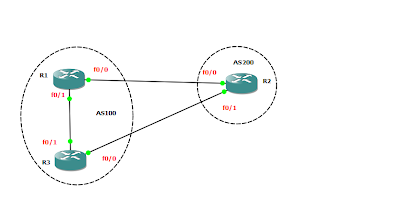
ORF is a BGP capability that would help customers that want to filter some BGP routes from their SP doing this filter in more efficient way. In our traditional ways of inbound  filtering (route-maps, prefix lists, distribute lists..etc.) we have to receive the routes from the peer and then filter them form entering our routing table, this can be ok if you don’t have a large number of updates but the current 400K + routes in the global routing table this might not be the most efficient way of doing it since you will be receiving the 400K routes, process them and then accept the routes that you need from the SP, a better way of doing this is using the ORF capability which simply means that one peer instructs (send) the other peer the routes that it needs before that peer even sending it so we will both save on our routers processes and our bandwidth let’s see what happens with and without the ORF configuration R1 interface Loopback0   ip address 1.1.0.1 255.255.255.0 ...

BGP Inject Map

Image
R1 configuration interface FastEthernet0/0   ip address 10.1.12.1 255.255.255.0   duplex auto   speed auto ! interface FastEthernet0/1   ip address 10.1.13.1 255.255.255.0   duplex auto   speed auto ! router bgp 100   no synchronization   bgp log-neighbor-changes   network 1.1.0.0 mask 255.255.255.0   network 10.1.13.0 mask 255.255.255.0   neighbor 10.1.12.2 remote-as 200   neighbor 10.1.13.3 remote-as 300   no auto-summary R2 configuration interface Loopback0   ip address 2.2.0.2 255.255.255.0 ! interface Loopback1   ip address 2.2.1.2 255.255.255.0 interface FastEthernet0/1   ip address 10.1.12.2 255.255.255.0   duplex auto   speed auto ! router bgp 200   no synchronization   bgp log-neighbor-changes   network 2.2.0.0 mask 255.255.255.0   network 2.2.1.0 mask 255.255.255.0   aggregate-address 2.2.0.0 255.255.252.0 as-set summary-only   neighbor 10.1.12....

BGP Conditional Routing Advertise Map

Image
  R1 configuration interface Loopback0 ip address 1.1.0.1 255.255.255.0 ! interface Loopback1 ip address 1.1.1.1 255.255.255.0 ! interface FastEthernet0/0 ip address 10.1.12.1 255.255.255.0 duplex auto speed auto ! interface FastEthernet0/1 ip address 10.1.13.1 255.255.255.0 duplex auto speed auto ! router bgp 100 no synchronization bgp log-neighbor-changes network 1.1.0.0 mask 255.255.255.0 network 1.1.1.0 mask 255.255.255.0 network 10.1.13.0 mask 255.255.255.0 neighbor 10.1.12.2 remote-as 100 neighbor 10.1.13.3 remote-as 300 no auto-summary R2 configuration interface FastEthernet0/1   ip address 10.1.12.2 255.255.255.0   duplex auto   speed auto ! router bgp 100   no synchronization   bgp log-neighbor-changes   neighbor 10.1.12.1 remote-as 100   no auto-summary R3 configuration interface Loopback0   ip address 3.3.0.3 255.255.255.0 interface Loopback1   ip address 3.3.1.3 255.255.255.0 interface F...

BGP Backdoor

Image
R1 configuration interface FastEthernet0/0   ip address 10.1.12.1 255.255.255.0   duplex auto   speed auto ! interface FastEthernet0/1   ip address 10.1.13.1 255.255.255.0   duplex auto   speed auto ! router bgp 100   no synchronization   bgp log-neighbor-changes   neighbor 10.1.12.2 remote-as 200   neighbor 10.1.13.3 remote-as 300   no auto-summary R2 configurations interface Loopback0   ip address 2.2.2.2 255.255.255.0 ! interface FastEthernet0/0   ip address 10.1.12.2 255.255.255.0   duplex auto   speed auto ! interface FastEthernet0/1   ip address 10.1.23.2 255.255.255.0   duplex auto   speed auto !          router eigrp 100   network 2.2.2.2 0.0.0.0   network 10.1.23.2 0.0.0.0   auto-summary ! router bgp 200   no synchronization   bgp log-neighbor-changes   network 2.2.2.0 mask 255.255.255.0   neighbor 10....

BGP Aggregation

Image
In this post we will try to understand how BGP advertise summary addresses and various options of doing that This is our setup  R1 R2 R3 R3 R4 Task 1 configure R1 to advertise a summary address that encompass all it’s loopback address summary addresses are configured using aggregate-address command under the BGP process by default BGP advertise   the summary address and all specific prefixes so on R1 now let’s check the BGP on R4 we can clearly see that the 4 prefixes are being received along the summary address now let’s have a closer look at the aggregate address  on R4 we can see another attribute called atomic-aggregate, the atomic aggregate attribute is well know discretionary attribute The purpose of this attribute is to signal other BGP peers that some path information have been lost along the way we might not be able to see this attribute in this scenario because R1 is the one doing the aggregation so what happens if R2 is the router that does the aggregatio...

BGP Route Reflecting

Image
    Before we start the lab we need to know why using route reflector, so for our topology R1 R2 R3 R4 are in AS 100 iBGP peering R1-R2 R1-R3 R1-R4 EBGP R1-R5 R1-R6 each router advertises the following subnets in the  BGP R1 1.1.0.0/24  10.1.15.0/24 10.1.16.0/24 R2  2.2.0.0/24 R3 3.3.0.0/24 R4 4.4.0.0/24 R5 5.5.0.0/24 R6 6.6.0.0/24 Now lets check the BGP on various routers on R1 As we can see R1 BGP table looks good, we have all the routes from all neighbors R5 also looks good, all routes are received into BGP now let’s check R2 so on R2 we haven’t received the 2 loopbacks of R3 and R4 what about R3 Also on R3 the loopbacks of R2 and R4 are missing Tis normal behavior for BGP, routes received from iBGP peers are only advertised to EBGP peers but not to other iBGP  to prevent loops so in order for us to overcome this we basically have 3 solutions: 1- configure full mesh between all iBGP peers 2- use route reflectors 3- use ...

BGP Origin Code Attribute

Image
  MED or Multi Exit Discriminator is non-transitive attribute and is used to discriminate between two entry point of AS The lower MED value is preferred In our topology, both R5 and R6 will generate the same prefixes through BGP to R7 10.1.65.0/30 10.1.65.4/30 10.1.65.8/30 As we can see R7 is using R5 to route to these prefixes because the router-id is lower for R5 than R6 Using Origin-code attribute modify R5  so R7 route through R6 to reach these prefixes As we know  if Weight, Local preference, Originate and AS-PATH attribute for a route are the same BGP will compare the origin code attribute Origin Code is well know mandatory attribute where IGP is preferred over EGP over incomplete we has these routes  advertised through the network statement in the BGP process on R5 so I we change the origin to incomplete i.e redistribute them this will change their origin code to incomplete and therefore R7 will prefer R6 routes This can be seen from the BGP ...

BGP Local Preference

Image
  In the above topology R3 will generate these 2 prefixes 3.3.0.0/24 and 3.3.1.0/24 and R4 will generate these 2 prefixes 4.4.0.0/24 and 4.4.1.0/24 into BGP Our goal is to use local preference to force R1 to route to 3.3.0.0/24 through R4 Now let’s check the BGP routing table of R1 and R2 before doing any changes   As we can see both  R1 and R2 are using R3 to route to 3.3.0.0/24 now to apply local preference we need to match the prefix with a prefix list and then use a route-map to apply the route-map inbound to R4 on R1 (we want to influence outbound traffic so route-map should be applied inbound) R1(config)#ip prefix-list R3_NET permit 3.3.0.0/24 R1(config)#route-map LOCAL_PREF permit 10 R1(config-route-map)#match ip address prefix-list R3_NET R1(config-route-map)#set local-preference 200 R1(config-route-map)#route-map LOCAL_PREF permit 100     R1(config)#router bgp 100 R1(config-router)#neighbor 10.1.14.4 route-map LOCAL_PREF...

BGP disable-connected-check

Image
All routers are running OSPF as IGP iBGP is configured between R1 and R3 eBGP is configured between R1  and R2 and R3 and R2 eBGP between R1 and R2 should be configured using their loopback interfaces, one way to achieve this  is to configure eBGP multihop where TTL values of the BGP packets is increased. Another way of doing it  is to use the   disable-connected-chec k   command under the BGP configuration, this will allow the two routers to become neighbours but only through direct connected links since the TTL is not touched  let's check the configurations on R1 and R2 R1(config-router)#do sh run | sec router bgp router bgp 100  no synchronization  bgp log-neighbor-changes  neighbor 2.2.2.2 remote-as 200  neighbor 2.2.2.2 disable-connected-check  neighbor 2.2.2.2 update-source Loopback0  neighbor 10.1.13.3 remote-as 100  no auto-summary R2(config-router)#do ...